Heym: Drop Ejentum Into an Agent
A walkthrough for builders using Heym, the AI-native automation platform. How to wire Ejentum's cognitive harnesses into a Heym Agent node, two ways: an HTTP node holding a cURL contract, or ejentum-mcp wired into the agent's MCP Connections.
No Python. No SDK. Self-hosted Docker stack.
What's Heym? Closest analog: n8n with first-class agent primitives. Heym describes itself as "an AI-native automation platform built from the ground up around LLMs, agents, and intelligent tooling." Self-hosted via Docker. Native AI-Engine primitives include LLM and Agent nodes with tool calling, canvas node tools (any node on the canvas can be exposed to an agent as a callable tool), multi-agent orchestration (one agent orchestrates named sub-agents and sub-workflows visually), per-node persistent memory (a knowledge graph), MCP integration on both sides (consume external MCP servers; expose workflows as MCP servers), and Skills (portable
SKILL.mdcapability bundles). Repo: github.com/heymrun/heym.
Cross-IDE install instead? If you want the same eight tools in Claude Desktop, Cursor, Windsurf, Claude Code, n8n's MCP Client node, or any other MCP-compatible client, see the MCP server guide. One install line, every client. This guide is Heym-specific.
Why Heym
Two Heym primitives that this guide uses:
- Canvas node tools. Any workflow node (HTTP, sub-workflow, Python tool) can be wired into an Agent's Tool input. Inside that node, you mark individual fields as agent-provided (a bot icon next to the field), and the agent fills those fields at runtime per call. This is what Path A uses to expose the Ejentum HTTP endpoint as a tool.
- Native MCP client. Each Agent node has an MCP Connections section that connects to external MCP servers via stdio, SSE, or Streamable HTTP. Tools served by the connected MCP server appear as native tools on the agent, alongside any canvas-node tools. This is what Path B uses to drop in
ejentum-mcp.
Same agent, same canvas, two integration shapes. Pick the one that matches your stack.
What Ejentum adds
Same model. Same prompt. The agent reasons through the task instead of answering at face value.
LLMs have characteristic failure modes: they agree when they should challenge, fabricate citations under pressure, jump to causal conclusions on partial evidence, and pattern-match to generic templates instead of analyzing the specific situation in front of them. Ejentum returns a piece of context tuned to the task: which of those failure modes is most likely here, which reasoning moves the task actually requires, and an explicit check the agent runs on its own output before finishing.
The agent reads that context before its first token. The model is unchanged; what changes is HOW the agent reasons on this particular task.
Concretely, this is the captured response from a real mode: reasoning call on the prompt "plan a migration from a single Postgres instance to a sharded setup with hot-cutover under 5 minutes downtime":
[NEGATIVE GATE]
The database migration will take two weeks: that's our best-case estimate
and the team is experienced, so there's no reason to add buffer. We'll hit
the deadline if everything goes according to plan.

[PROCEDURE]
Step 1: Extract every duration estimate and identify its basis: historical
data, expert judgment, or optimistic assumption. Step 2: Compare each
estimate against historical base rates or p90 benchmarks for similar tasks.
Step 3: Flag estimates below the historical median as likely optimistic.
Step 4: Never accept best-case estimates as planning targets. Step 5: If an
estimate lacks historical basis, simulate impact with a 1.5x-2.0x buffer.
Verify the final timeline accounts for cascading delay propagation.

[REASONING TOPOLOGY]
S1:extract_duration_estimates → N{accept_best_case_estimates_planning_targets}
→ S2:identify_basis(historical|expert|assumption) →
FIXED_POINT[historical_base_rates] → S3:compare(estimate_vs_p90_benchmark) →
G1{below_median?} --yes→ FLAG:likely_optimistic → S4:apply_buffer(1.5x_to_2x)
→ S3[LOOP] --no→ G2{lacks_historical_basis?} --yes→ S4b:simulate_with_buffer
--no→ S5:apply_adjusted_range → S6:verify_cascade_delay → OUT:realistic_timeline

[TARGET PATTERN]
Challenge the two-week estimate: what do similar migrations actually take?
If past projects averaged four weeks at p90, the best-case anchor is
dangerously optimistic. Apply a variance multiplier for schema complexity,
data volume, and rollback testing: build buffer from the full distribution,
not the happy path.

[FALSIFICATION TEST]
If time estimates reflect only the best-case scenario without applying any
buffer multiplier, duration calibration has defaulted to optimism.

Amplify: hofstadter buffer application; p90 baseline comparison
Suppress: best-case anchoring; optimism bias
The agent reads this BEFORE answering the user. The user never sees the bracket labels; they see a migration plan that explicitly questions the timeline, applies buffer math, and verifies cascade-delay propagation, instead of producing the smoothed-out "do X, then Y" template a base model defaults to.
For per-mode injection examples (code, anti-deception, memory, plus the adaptive variants), see Examples. For statistical evidence across harder tasks, see the benchmarks.
Prerequisites
- A Heym instance (self-hosted via Docker). Get it at heym.run or directly from github.com/heymrun/heym.
- An Ejentum API key. Grab one from the dashboard. Free trial: 1,000 dynamic calls (30 days, no credit card). Go: 1,000 dynamic + 250 adaptive calls/month. Super: 5,000 dynamic + 1,500 adaptive. One harness call = one call against the matching pool.
- LLM credentials in Heym for whichever model your agent runs on (Anthropic, Google, OpenAI, OpenRouter for Chinese models).
- (Path B only) Node.js 18+ available to the Heym container. Heym's published Docker images already include Node, so this is satisfied out of the box.
Getting the Ejentum key: sign in, open the Account tab, click Generate Key under API Keys. Copy the full key (starts with
ej_).
Path A: HTTP Request as a canvas tool
This path puts a single HTTP node on the canvas and wires it as the agent's tool. The agent rewrites the cURL at call time, picking the harness mode itself per task. Use this path when you want full control over which mode fires, or when you're building toward a multi-agent team where each specialist locks to a specific mode.
Step A1: Create the Ejentum Bearer credential
In Heym, open Credentials and click + New Credential:
- Name:
EjentumLogicApi. The dialog shows the access expression (Access via: $credentials.EjentumLogicApi) directly under the Name field; cURL nodes reference the credential through that expression. - Type: Authorization Bearer Token (the dropdown option labeled exactly that; helper text underneath: "Store a Bearer token for Authorization header").
- Bearer Token: paste your Ejentum API key. Just the key (
ej_...), noBearerprefix. Heym sends it asAuthorization: Bearer <token>; the helper text under the field confirms this.
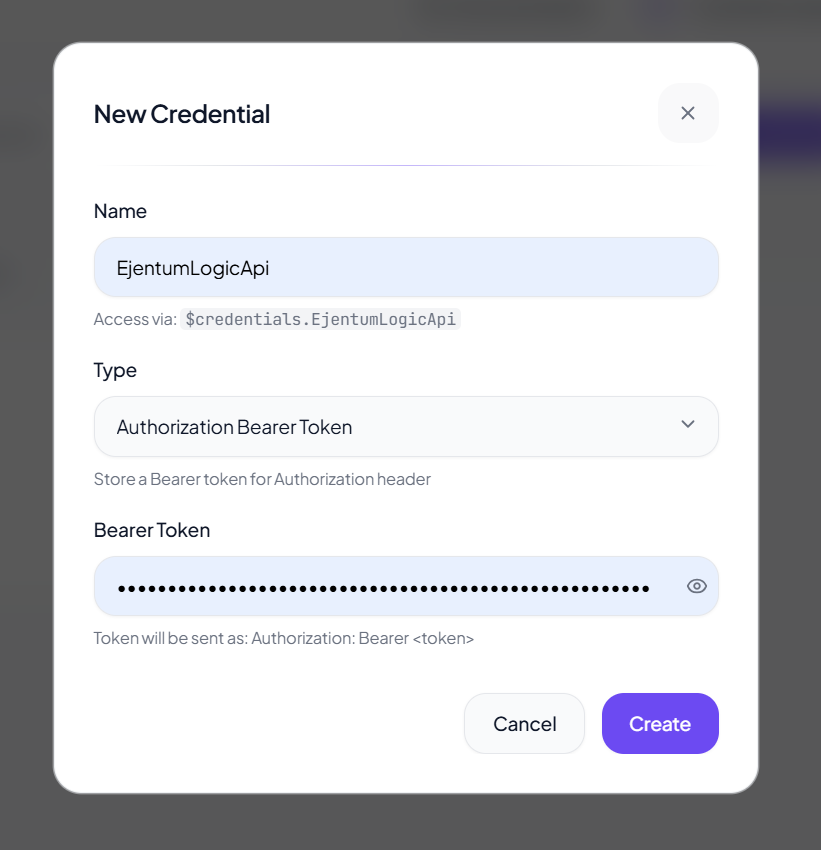
Click Create. The credential is now resolvable from any node in any workflow via $credentials.EjentumLogicApi.
Step A2: Add the canvas
- Drop a chatInput trigger.
- Drop an Agent node downstream. Pick any chat model (Claude, Gemini, GPT, Qwen). Wire chatInput's output into the Agent's input handle (handles are the small colored dots on each node's edge; "input" is on the left, "tool-input" on the top, "output" on the right).
- Drop an HTTP node off to the side. Set its
labeltoejentumLogic(the agent references it by this label in tool calls).
Three nodes on the canvas. The HTTP node is free-floating for now.
Step A3: Configure the HTTP node's cURL
Heym's HTTP node has two main fields: label (already set) and curl (the full cURL command as a string). Paste:
curl -X POST "https://api.ejentum.com/harness/" \
  -H "Authorization: $credentials.EjentumLogicApi" \
  -H "Content-Type: application/json" \
  -d '{"query": "test query", "mode": "reasoning"}'
Two details that matter:
- The Authorization header value is the bare expression
$credentials.EjentumLogicApi. Do not type the wordBearerhere. The credential resolves toBearer <your-key>already because the credential type isbearer. - The body is a JSON literal with
queryandmode. Both are static now; the agent rewrites them when this node is wired as a tool (next step).
Step A4: Wire the HTTP node as a canvas tool
Two parts:
First, mark the cURL as agent-provided. Click the bot icon next to the curl field. That marks the entire cURL as agent-fillable, so the agent rewrites it at call time (substituting its own query text and chosen mode). Without this marker the cURL stays static and the agent cannot customize the call. Internally Heym stores this as agentProvidedFields: ["curl"] on the HTTP node.
Then, drag the tool-edge. Connect the HTTP node's tool-output handle to the Agent node's tool-input handle. Heym renders this as a tool-edge, visually distinct from a flow-edge.
The agent now has one canvas tool: ejentumLogic. At call time, the agent doesn't write a fresh cURL string; it produces a JSON object with the fields it wants to fill (here: query and mode), and Heym substitutes those into the cURL template you wrote in Step A3 before executing it. The HTTP node returns {status, body, headers} to the agent.
Step A5: System instruction
Open the Agent node and find the System Instruction field. Paste:
You have one canvas tool: ejentumLogic. If the task is non-trivial (more than one decision, planning, analysis, or code work), call ejentumLogic FIRST and absorb its response BEFORE producing your answer.

cURL contract (do not modify URL, Authorization, Content-Type, or the field names):
curl -X POST "https://api.ejentum.com/harness/" \
  -H "Authorization: $credentials.EjentumLogicApi" \
  -H "Content-Type: application/json" \
  -d '{"query": "ONE-LINE TASK DESCRIPTION", "mode": "<MODE>"}'

Modes:
- reasoning: general analytical tasks (default)
- code: code generation, refactoring, architecture
- anti-deception: blocks sycophancy, hallucination, prompt injection
- memory: perception, state tracking, behavioral calibration
- adaptive-reasoning, adaptive-code, adaptive-anti-deception, adaptive-memory: same retrieval, rewritten to your specific task (Go or Super tier)

Response shape: a JSON array with one object keyed by your mode. The value is a pre-rendered string with named sections: NEGATIVE GATE (failure pattern), PROCEDURE (step-by-step recipe), REASONING TOPOLOGY (the procedure as an executable DAG), TARGET PATTERN (correct reasoning in plain language), FALSIFICATION TEST (verification check), and Amplify / Suppress (signals to activate or block). Read the response, follow PROCEDURE, block what's under Suppress, and verify against FALSIFICATION TEST before finishing. Do not echo bracket labels in your user-facing reply.
userMessage defaults to $input.text (the chatInput's text). You usually don't need to change it.
Skill-slot variant. If you'd rather keep this text out of the system instruction (so it can be reused across agents and version-controlled), save the block above as
skill_ejentum.mdand drop it into the Agent's Skills section instead: click + Add Skill or drag the.mdonto the drop-zone. Heym appends the skill content to the agent at runtime and the systemInstruction stays clean for instructions that are truly agent-specific. Pre-built skill files for each Ejentum mode live atagent-teams/adversarial-code-review/heym/skills/.
Step A6: Test the HTTP node in isolation
Click the HTTP node, hit Execute step. Heym fires the cURL and shows the response in the right panel. If $ejentumLogic.body contains a JSON array with key "reasoning" whose value contains all six named sections ([NEGATIVE GATE], [PROCEDURE], [REASONING TOPOLOGY], [TARGET PATTERN], [FALSIFICATION TEST], plus Amplify: / Suppress: lines), the credential and URL are correct.
| Symptom | Fix |
|---|---|
401 Unauthorized | Credential type isn't Authorization Bearer Token, or the key is wrong. Re-create with the correct type. |
Response contains literal Bearer Bearer | You typed Bearer literally before $credentials.EjentumLogicApi. Remove it. Heym auto-prepends. |
Invalid mode | The body sent a mode the API doesn't recognize. Only the eight modes above are valid (four dynamic, four adaptive). |
null body | URL is wrong. Must be https://api.ejentum.com/harness/ (trailing slash optional). |
Step A7: Run the full workflow
Send a chat message. Example:
Plan a migration from a single Postgres instance to a sharded setup, with hot-cutover in under 5 minutes downtime.
The agent reads the system instruction, classifies the task as non-trivial, calls ejentumLogic (filling in query from its own framing and choosing reasoning, or adaptive-reasoning on Go/Super), receives the scaffold, then plans the migration shaped by [PROCEDURE] and the Suppress: signals. The HTTP node fires once with a green check.
Acceptance criterion for "the harness actually shaped the answer": the reply names specific failure modes it considered (e.g. "the rollback path if hot-cutover stalls past the 5-minute window"), proposes verification checkpoints rather than just steps, and avoids generic templates ("first do X, then Y"). If the reply reads as a smoothed-out checklist, the agent absorbed the scaffold loosely; tighten the system instruction's "absorb its response BEFORE producing your answer" line and try again.
Path B: ejentum-mcp via the agent's MCP Connections
This path skips the HTTP node entirely. ejentum-mcp is the official Ejentum MCP server published on npm; Heym's Agent node has a native MCP Connections section that spawns the server via stdio and exposes its eight tools to the agent. No cURL contract to write, no agentProvidedFields toggle, no mode JSON field. The agent sees real tools by name and picks one.
Use this path when you want the cleanest tool list, when the agent should reason about which harness fits the task using natural-language tool descriptions instead of a mode enum, or when you're already standardizing on MCP across other clients (Cursor, Claude Code, claude.ai).
Step B1: Add the canvas
- Drop a chatInput trigger.
- Drop an Agent node and wire chatInput's output into the Agent's input handle.
That's it. Two nodes. No HTTP node, no canvas-tool wiring.
Step B2: Add the MCP connection on the Agent
Click the Agent node to open its inspector. Scroll to the MCP Connections section (look for the header with the Server icon). Click + Add MCP. Fill the form:
| Field | Value |
|---|---|
| Transport | stdio |
| Timeout (s) | 30 |
| Label (optional) | ejentum |
| Command | npx |
| Args (JSON array) | ["-y", "ejentum-mcp"] |
| Env (JSON object) | {"EJENTUM_API_KEY": "your_ej_key_here"} |
Save. The Env (JSON object) field is what authenticates the spawned ejentum-mcp process; the API key lives on the connection, scoped to this agent. Heym's Expression DSL works inside the JSON value too (e.g. $global.ejentumKey) if you'd rather not paste the key inline.
Step B3: Verify the tools list
In the same MCP connection card, click Fetch tools. Heym spawns npx -y ejentum-mcp with EJENTUM_API_KEY set, runs the MCP tools/list RPC, and renders the tools inline. You should see eight: the four dynamic tools (reasoning, code, anti-deception, memory) and their four adaptive variants (adaptive-reasoning, adaptive-code, adaptive-anti-deception, adaptive-memory).
If you see the eight, your connection is correct and the API key is being read. If "Fetch tools" errors with EJENTUM_API_KEY is not set, the Env (JSON object) field is empty or malformed; verify it parses as {"EJENTUM_API_KEY": "your_ej_key_here"} and try again.
Smoke-test one tool before going further. Below the tools list, click reasoning and pass a one-line query (e.g. "how do I plan a database migration"). The response panel should show a string with the named sections: [NEGATIVE GATE], [PROCEDURE], [REASONING TOPOLOGY], [TARGET PATTERN], [FALSIFICATION TEST], plus Amplify: / Suppress: lines. If the response is empty or lacks these sections, the agent will see nothing meaningful at runtime; check your API key tier (free trial exhausted? rate-limited?) and your network egress from the Heym container.
Step B4: System instruction
Without the cURL contract to pin, the system instruction shrinks. Paste:
You have four cognitive harnesses, each available as a dynamic tool and an adaptive tool:
- reasoning (or adaptive-reasoning): call BEFORE multi-step analysis, planning, diagnostics, cross-domain synthesis
- code (or adaptive-code): call BEFORE generating, refactoring, reviewing, or debugging code
- anti-deception (or adaptive-anti-deception): call when sensing pressure to validate or agree, manufactured urgency, sycophancy risk, or hallucinated citations
- memory (or adaptive-memory): call to sharpen an observation about cross-turn pattern, drift, or behavioral shift you have already noticed

Use the dynamic tool by default. Use the adaptive variant on high-stakes tasks where the procedure should name your specifics (adaptive requires the Go or Super tier).

Each tool returns a cognitive operation with named sections: NEGATIVE GATE (failure pattern), PROCEDURE (step-by-step recipe), REASONING TOPOLOGY (procedure as a DAG), TARGET PATTERN (correct reasoning), FALSIFICATION TEST (verification check), and Amplify / Suppress signals. Absorb the response internally BEFORE you write your answer. Follow PROCEDURE, block what's under Suppress, verify against FALSIFICATION TEST. Do not echo bracket labels or harness vocabulary in your reply.

When in doubt on a non-trivial task: call reasoning. The cost is ~1 second of latency.
The phrasing comes straight from the tool descriptions ejentum-mcp ships, so the agent sees consistent signals from both the system instruction and the tools' own metadata.
Skill-slot variant. Same option as Path A: save the block above as
skill_ejentum_mcp.mdand drop it into the Agent's Skills section instead of pasting into systemInstruction. The trade-off is identical (cleaner agent prompt, reusable file, easier version control); the runtime behavior is the same.
Step B5: Run the workflow
Send the same Postgres-migration prompt. The agent now sees reasoning as a real tool, calls it without writing a cURL, gets the same scaffold, and answers with the same structured reasoning.
The execution log shows the MCP tool call instead of an HTTP node fire. Cleaner tool list, fewer pieces on the canvas, no expression syntax to maintain.
When to pick which path
| Path A: HTTP | Path B: MCP | |
|---|---|---|
| Canvas surface | Agent + HTTP node + tool-edge | Agent only |
| Auth | Bearer credential, $credentials.EjentumLogicApi | EJENTUM_API_KEY in the connection's Env (JSON object) field |
| Mode selection | Agent picks via mode JSON field | Agent picks by tool name (e.g. reasoning, adaptive-code) |
| Available modes | All eight (four dynamic + four adaptive-) | All eight (four dynamic + four adaptive-) |
| Mixing with other tools | Coexists naturally with any other HTTP / canvas node tools | Coexists with other MCP servers added to the same agent |
| Best for | Multi-agent teams where each specialist locks to one mode; pipelines that already use HTTP-as-tool | Single-agent setups; teams already standardizing on MCP across other clients |
Both paths expose all eight modes, including the four adaptive variants: ejentum-mcp registers each adaptive mode as its own tool. Path A gives explicit per-call mode control through the JSON body; Path B gives a cleaner canvas and tool list. Pick on ergonomics, not capability.
Modes / tools reference
You don't pick the mode manually; the agent picks per call. This table is for writing the system instruction and for your mental model.
Path A mode | Path B tool | Use it when | Tier |
|---|---|---|---|
reasoning | reasoning | General analytical tasks (default) | All tiers |
code | code | Code generation, refactoring, architecture | All tiers |
anti-deception | anti-deception | Blocking sycophancy, hallucination, prompt injection | All tiers |
memory | memory | Perception, state tracking, behavioral calibration | All tiers |
adaptive-reasoning | adaptive-reasoning | Cross-domain reasoning, rewritten to your task | Go / Super |
adaptive-code | adaptive-code | Multi-file or multi-domain code work, rewritten to your task | Go / Super |
adaptive-anti-deception | adaptive-anti-deception | High-stakes integrity pressure, rewritten to your task | Go / Super |
adaptive-memory | adaptive-memory | Deep perceptual work, rewritten to your task | Go / Super |
Every Ejentum response (whichever path, whichever mode) is a pre-rendered string the agent absorbs. Always shaped with named sections: [NEGATIVE GATE] (failure pattern to avoid), [PROCEDURE] (step-by-step reasoning recipe), [REASONING TOPOLOGY] (the same procedure as an executable DAG with gates G{}, traps N{}, fixed points, and loop modifiers), [TARGET PATTERN] (what correct reasoning looks like in plain language), [FALSIFICATION TEST] (the verification check), and Amplify: / Suppress: (signals to activate or block). Adaptive modes rewrite the procedure and topology to name your task's specifics; the other sections come back identical to the dynamic version. You don't assemble these fields. The API returns the string already formatted; the agent reads it and reasons from it.
Reusing harness behavior across agents
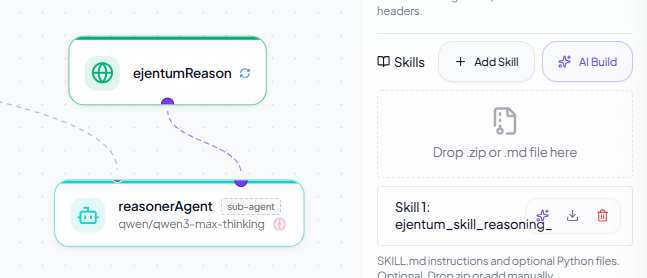
Once Path A or Path B works on one agent, the next question is how to reuse it across many agents without copy-pasting the system instruction. Heym Agent nodes have a Skills section in the inspector that takes SKILL.md files (with optional Python tools as a .zip); content of the skill is appended to the agent's runtime instruction independently of the systemInstruction text field. Same runtime behavior; different storage and reusability properties.
| Property | System Instruction (text field on the agent) | Skills slot (SKILL.md file dropped on the agent) |
|---|---|---|
| Where it lives | Inline in the workflow JSON, on this one agent | A separate .md file on disk; the agent points at it |
| Reusable across agents | No (paste again each time) | Yes (drop the same file into another agent's Skills section) |
| Version control | Hand-managed via workflow JSON exports | Each SKILL.md is its own file, easy to git, easy to diff |
| Carries Python tools | No | Yes, as an optional .zip bundled with the SKILL.md |
| Edit cadence | Quick to tweak inline | Edit the file once; every agent using it picks up the change on next run |
| Best for | Quick demos, agent-specific prompts, one-shot setups | Multi-agent teams, anything you'll port to a new workflow |
The skill files for each Ejentum mode are pre-built at agent-teams/adversarial-code-review/heym/skills/ (skill_reasoning.md, skill_code.md, skill_anti_deception.md, skill_memory.md). Drop one into any Agent's Skills section (click + Add Skill or drag the .md onto the drop-zone) and the agent gets the harness call rules without you touching the system instruction. To see this pattern in production, the multi-agent team in the next section uses skill files for exactly this reason.
See it at scale: a 4-agent team using Path A
One-click on Heym's templates gallery: heym.run/templates/adversarial-code-review. Click Import → Copy JSON, paste into a fresh Heym canvas with Cmd/Ctrl+V, add API keys, run.
The patterns above scale. The cleanest demonstration is an adversarial code review team: an architect agent (no harness, just orchestration) delegates to three specialists with isOrchestrator: true and three sub-agent labels.
Architecture. The architect cannot fabricate concerns of its own (no cognitive harness wired to it), so every concern in the final verdict comes from a specialist's evidence. Single agents tend to produce smoothed-out averages; this team produces friction by design.
How each specialist gets its harness. Each specialist has its own HTTP node holding a cURL contract pinned to one mode (Path A applied three times: reasonerAgent → reasoning, implementerAgent → code, reviewerAgent → anti-deception). Each specialist also has its mode-specific skill file (skill_reasoning.md, skill_code.md, skill_anti_deception.md) dropped into its Skills slot; that's where the call rules persist. Cloning the workflow doesn't lose the rules because they live in the skill files, not the prompt.
UI cue. Sub-agent nodes carry a sub-agent pill in the canvas to distinguish them from the orchestrator at a glance.
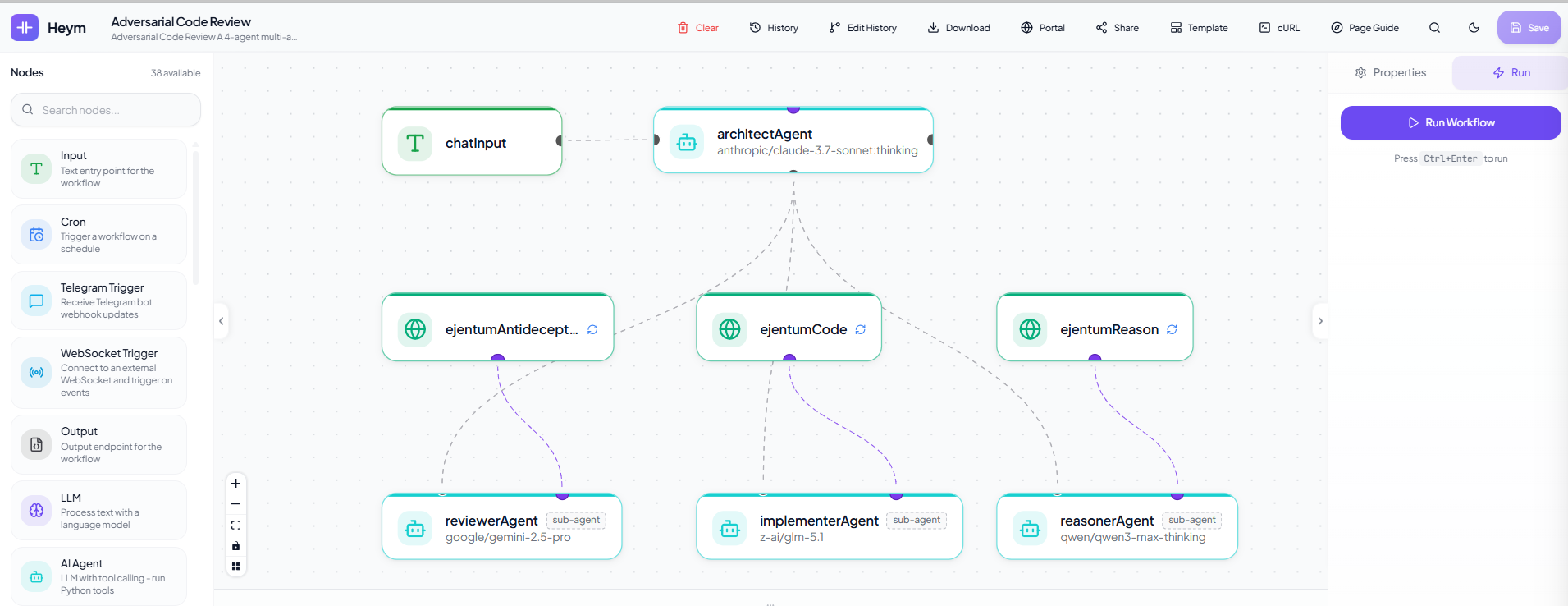
A complete worked example with skills, system prompts, model assignments, and four verification tests ships at github.com/ejentum/agent-teams/tree/main/adversarial-code-review/heym. Cross-lab agent diversity by design: Anthropic + Google + Alibaba (Qwen) + Zhipu (GLM).
Production checklist
Before pointing real traffic at a Heym agent that calls Ejentum, here's what matters in production. These properties are platform behaviors, not Ejentum-specific.
Performance. Dynamic harness calls (reasoning, code, anti-deception, memory) typically return in under 1 second; adaptive modes add an LLM rewrite pass and return in roughly 2-3 seconds. A typical agent run makes 1-3 harness calls per turn. Plan latency budgets accordingly.
Reliability and fallback. Heym's HTTP node defaults to retry-on-failure with retryEnabled: true, retryMaxAttempts: 2; leave it on. Ejentum is designed as an enhancer, not a gate: if the API is unreachable past the timeout, the agent should proceed with native reasoning rather than block. Set the HTTP node's timeout to ~5 seconds; if the call doesn't return in time, the agent falls back to base-model behavior. The harness raises floor performance; missing it doesn't break the workflow.
Cost accounting. One harness call equals one call against the matching pool (dynamic or adaptive). If your agent makes three dynamic calls per turn (typical for multi-aspect tasks), the free trial (1,000 dynamic calls) covers roughly 300-500 agent runs depending on retry behavior. Use the trial to evaluate, then upgrade to Go (1,000 dynamic + 250 adaptive/month) for prototype traffic or Super (5,000 + 1,500) for production.
Credential security. Path A: the Bearer credential value lives in Heym's credential store, not in workflow JSON. Exporting and sharing a workflow does NOT leak the token, only its credentialId reference. Path B: the API key sits in the agent's MCP connection's Env (JSON object) field, which IS in the workflow JSON. To avoid leaking on export, store the key as a Heym global variable and reference it as $global.ejentumKey in the Env field instead of pasting inline.
Logging and privacy. Treat query as transmitted data: don't put PII or proprietary content in it. Use generic framings (e.g. "plan a database migration" instead of "plan migration of customer SSN table from prod-east"). The query is what gets matched against the ability index; abstraction usually helps retrieval anyway.
Troubleshooting
Path A (HTTP)
401 Unauthorized. Credential type must be Authorization Bearer Token (the exact dropdown label, internal type bearer). The token field takes the raw key with no Bearer prefix; Heym prepends it.
Double Bearer Bearer. The cURL Authorization header has the literal word Bearer typed before $credentials.EjentumLogicApi. Remove it.
Agent never calls the tool. Three usual causes, in order: (a) the system instruction doesn't say "call BEFORE executing"; (b) the test task is too trivial; (c) the bot icon next to the curl field isn't enabled.
Agent calls the tool every time. Soften the instruction ("call ejentumLogic when the task has more than one decision or requires planning").
Agent calls the tool but ignores the response. Add to the instruction: "Inject the response BEFORE you start the task. Follow [PROCEDURE]. Block what's under Suppress:."
Invalid mode. The body sent a mode the API doesn't recognize. Only the eight modes above are valid (four dynamic, four adaptive).
Path B (MCP)
"Fetch tools" returns EJENTUM_API_KEY is not set. The Env (JSON object) field on the MCP connection is missing, empty, or malformed. Open the connection card, confirm the field parses as {"EJENTUM_API_KEY": "your_ej_key_here"}, and retry. If you don't see an Env field at all, your Heym is older than the version that shipped per-connection env (set the variable on Heym's backend container instead and restart).
"Fetch tools" hangs or times out. Node.js may not be in the Heym container's PATH. Heym's published images include Node 18+, but custom builds may not. Test with docker compose exec backend npx --version.
Tools list shows up but the agent ignores them. The system instruction is too vague. The eight tool descriptions ejentum-mcp ships are detailed; adding the call-condition lines from Step B4 above pins when the agent should fire each.
Args (JSON array) field rejects the value. It expects valid JSON. ["-y", "ejentum-mcp"] (with the brackets and quotes) is correct. Bare strings like -y ejentum-mcp will fail validation.
Both paths
Rate limit (429). The free trial is 1,000 dynamic calls. Upgrade to Go for 1,000 dynamic + 250 adaptive calls/month, or Super for 5,000 + 1,500.
Next steps
- Browse the 679 abilities the agent is pulling from.
- Read the MCP server guide for installing ejentum-mcp in Claude Desktop, Cursor, Windsurf, Claude Code, and n8n.
- Read the n8n guide for the same dual-path idea in n8n.
- See the benchmarks for statistical evidence, not single-example demos.
- Self-host Heym and browse its source on GitHub.
- Browse Heym's templates gallery for the one-click adversarial code review starter that demonstrates the multi-agent application of Path A.
- Clone the agent-teams template for source control / customization.
- Start free if you're running agents in production.
Questions: info@ejentum.com.